Category: Tools I Use

  • Why My Food Scale is One of My Most Important Tools

    Why My Food Scale is One of My Most Important Tools

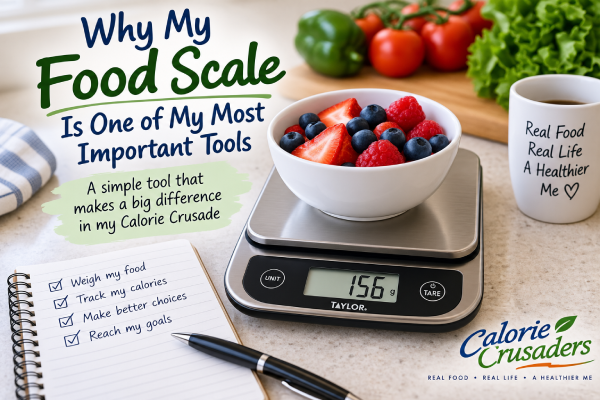
    There’s a little digital scale sitting on my kitchen counter.

    It isn’t fancy. It doesn’t tell me what to eat. It doesn’t count my calories for me, and it certainly doesn’t care whether I’m on a diet.

    But it may be one of the most important tools in my Calorie Crusader toolbox.

    It’s my food scale.

    How Much Am I Really Eating?

    Counting calories sounds pretty simple.

    Figure out how many calories are in your food, keep track of them and stay within your calorie budget.

    There’s just one little problem.

    You have to know how much food you’re eating.

    If a serving contains 150 calories, I’m not going to lose weight if I think I’m eating one serving when I’m actually eating a serving and a half most of the time.

    That’s where my food scale comes in.

    My Eyes Aren’t Measuring Cups

    I’ve learned that I’m not particularly good at looking at a pile of food and knowing exactly how much it weighs.

    I doubt many people are.

    An ounce of this, three ounces of that, 28 grams of something else—those amounts can be surprisingly difficult to judge just by looking at them.

    And some foods pack a lot of calories into a fairly small amount.

    So instead of guessing, I weigh it.

    That little number on the scale takes the guesswork out of the equation.

    Grams Make Things Easy

    One thing I’ve come to appreciate is weighing food in grams.

    Food labels often give serving sizes in grams, and Cronometer lets me enter foods by weight. That makes the food scale and Cronometer a pretty good team.

    I can put something on the scale, see exactly how many grams I’m eating and enter that amount.

    No guessing whether I had “about” a serving.

    I know.

    There’s a Button I Really Like

    If you’ve never used a digital food scale, there’s one little feature that makes the whole thing remarkably easy.

    The tare button.

    I can put my bowl or plate on the scale and press tare. The scale goes back to zero.

    Then I add my food, and the scale tells me only what the food weighs.

    I can even zero it again before adding another ingredient.

    It’s a tiny feature, but I use it all the time.

    Sometimes the Scale Surprises Me

    This may be one of the most useful things about weighing food.

    Sometimes I discover that the amount I thought was a serving was considerably more than a serving.

    Other times I discover I can have more than I thought.

    I like those surprises better.

    Either way, I have information I didn’t have before.

    And if there’s a recurring theme developing in my Calorie Crusade, it’s that I like information.

    Do I Have to Weigh Everything Forever?

    I don’t think the point is to become afraid to eat something unless there’s a scale nearby.

    There will be restaurant meals. There will be meals at someone else’s house. There will be times when weighing something simply isn’t practical.

    Then I’ll make my best estimate and move on.

    But at home, when my scale is sitting right there on the counter, why guess when I can know?

    The more often I weigh the foods I regularly eat, the better I also become at recognizing what reasonable portions actually look like.

    Another Tool in the Toolbox

    I’ve already written about Cronometer, which helps me keep track of my calories and nutrients.

    I have a glucose meter, which gives me another little window into what’s happening inside my body.

    And then there’s my food scale.

    It may be the simplest of the three.

    Put the food on it. Read the number. Enter the amount.

    That’s about it.

    But when I’m trying to count calories accurately, knowing how much I’m actually eating makes a tremendous difference.

    My food scale doesn’t decide what I can eat.

    It just keeps me honest about how much of it I’m eating.

    And on this Calorie Crusade, that’s a pretty useful little tool to have sitting on my kitchen counter.
  • My Favorite Tool for Counting Calories: Cronometer

    My Favorite Tool for Counting Calories: Cronometer

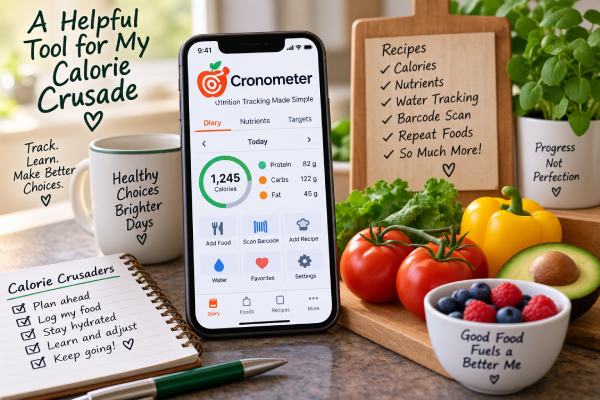
    I’m counting calories again, and this time around I have a tool that makes the job a whole lot easier. It’s the Cronometer calorie tracker, and it has quickly become one of my favorite tools in my Calorie Crusader toolbox.

    Before I go any further, I want to make something clear. Cronometer isn’t paying me to write this, and this isn’t a sponsored post. I just think it’s an excellent tool and one that’s worth talking about.

    More Than a Calorie Counter

    Obviously, one of the main things I need to know on my Calorie Crusade is how many calories I’m eating. Cronometer does that very well, but that’s really just the beginning.

    It also lets me see what’s actually in the food I’m eating.

    At a glance, I can keep an eye on things like fiber, sodium, added sugar, saturated fat and calcium. Instead of simply knowing that I’ve eaten a certain number of calories, I can look at a meal—or my entire day—and get a much better picture of how I’m doing nutritionally.

    I like that.

    Sometimes calories only tell part of the story.

    One of My Favorite Features: Recipes

    One of my favorite things about Cronometer is the recipe feature.

    I cook something, enter the ingredients into Cronometer, and it does the math for me. Once the recipe and serving information are entered, I can see the calories and nutrients in a serving.

    That is incredibly handy.

    Without something like this, figuring out the calories in a homemade recipe can become quite a project. You have to figure out the calories in every ingredient, add everything together and then divide it into servings.

    Cronometer does the work.

    And once I’ve entered the recipe, I have it available the next time I make it.

    Finding Foods Is Easy

    Cronometer also has a very large food database. Most of the foods I’m looking for are already there.

    For packaged foods, I can also scan the barcode. That can save quite a bit of time when I’m standing in the kitchen trying to get a meal entered.

    The easier it is to record what I eat, the more likely I am to actually do it.

    And that’s important.

    I Don’t Have to Enter the Same Things Over and Over

    Most of us have foods we eat regularly.

    If I eat the same thing from one day to the next, Cronometer has a premium feature that makes it possible to repeat those foods instead of making me start from scratch every morning.

    That may sound like a small thing, but those little conveniences add up.

    In a previous Calorie Crusaders article, “When Life Gets in the Way of Counting Calories“, I talked about some of the things that have caused me to stop counting calories in the past. Sometimes life simply became too busy and there were too many other things demanding my attention.

    So this time I’m paying attention to anything that makes the process easier.

    If something saves me a few minutes and removes one more little chore from my day, that’s a good thing.

    Even My Water Is in There

    I can also use Cronometer to keep track of my water.

    I like having that information right there along with my food instead of trying to remember separately how much I’ve had to drink during the day.

    Again, it’s one less thing to keep track of somewhere else.

    Information Helps Me Make Better Choices

    I think this may be what I like most about Cronometer.

    It gives me information.

    If I’m low on fiber, I can see it. If I’ve had more sodium than I realized, I can see that too. I can look at calcium, added sugar, saturated fat and other nutrients instead of simply concentrating on one number at the top of the page.

    I’m still counting calories. That’s the foundation of what I’m doing.

    But I’m also learning more about the food those calories are coming from.

    Another Tool for the Calorie Crusade

    No app is going to lose the weight for me.

    I still have to decide what I’m going to eat. I still have to decide how much I’m going to eat. And I still have to enter it honestly.

    But a good tool can make all of that easier.

    That’s what Cronometer does for me.

    It takes something that could involve a lot of calculating, writing things down and looking things up and puts it all together in one place.

    For someone who has decided to count calories for a long time—not just for a few weeks—that convenience matters.

    Glenn has even started using Cronometer too, so apparently I’m not the only one in this house who finds all those numbers useful.

    I’m trying to build habits that I can continue even when life gets busy.

    And right now, Cronometer is one of my favorite tools in the Calorie Crusader toolbox.