
Tag: Nutrition

  • Honey-Teriyaki Green Beans with Craisins and Pecans

    Honey-Teriyaki Green Beans with Craisins and Pecans

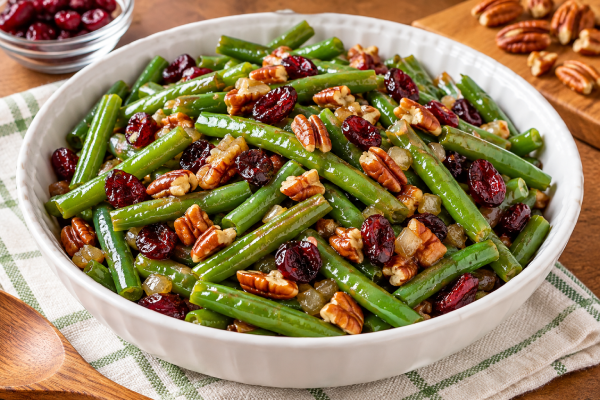
    These Honey-Teriyaki Green Beans with Craisins and Pecans turn an ordinary bag of frozen green beans into a colorful, flavorful dish. The teriyaki sauce and honey add a touch of sweetness, while the Craisins bring a little tang. Toasted pecans add a delicious crunch.

    This recipe is easy to prepare with simple ingredients and everyday measuring spoons. It starts with a 12-ounce bag of Great Value frozen green beans, so there’s no need to measure out part of a larger package.

    Serve these green beans alongside your favorite main dish, or enjoy a larger portion as a light meal. With our adjustable serving calculator, you can divide the recipe into 1 to 6 servings and see how each portion fits into your daily calorie goals.

    Visit our Calorie Crusaders Recipes page for more delicious ideas.

    Honey-Teriyaki Green Beans with Craisins and Pecans

    Total batch calories490
    Calories per serving163

    Slide from 1 to 6 servings. Ingredient amounts stay the same; nutrition per serving changes.

    Ingredients

    • 12 oz Great Value frozen green beans
    • 3 tablespoons Ocean Spray Original Craisins (dried cranberries)
    • 3 tablespoons chopped pecans
    • 3 tablespoons finely diced onion
    • 2 teaspoons olive oil
    • 2 tablespoons Great Value teriyaki sauce
    • 1 teaspoon honey
    • 1–2 tablespoons water, only if needed

    Instructions

    1. Toast the pecans. Add pecans to a dry skillet over medium heat. Stir for 2–3 minutes until fragrant; remove and set aside.
    2. Cook the onion. Add olive oil to the skillet and sauté onion for about 3 minutes.
    3. Cook the green beans. Add frozen green beans. Cook for about 6–8 minutes, stirring occasionally, until tender and most moisture has evaporated. Add a little water only if needed.
    4. Add flavor. Stir in teriyaki sauce, Craisins, and honey. Cook about 2 minutes more.
    5. Finish. Fold in toasted pecans just before serving.

    Estimated Nutrition

    NutrientWhole batchPer serving
    Calories490 kcal163 kcal
    Total fat26 g8.7 g
    Carbohydrates65 g21.7 g
    Total sugars31 g10.3 g
    Protein10 g3.3 g
    Sodium1330 mg443 mg

    Nutrition values are preliminary estimates based on typical ingredients and may differ from actual product labels, especially sodium and sugars. Calculated per-serving values are rounded. Water adds no calories.

    Calorie Crusaders Tip

    A side dish doesn’t always have to stay on the side!

    Sometimes a flavorful vegetable dish is just what you’re in the mood for. These Honey-Teriyaki Green Beans with Craisins and Pecans can be enjoyed as a traditional side dish or as the main attraction.

    Our serving calculator makes it easy to decide how much you want. Slide it to 3 for a generous side dish, or all the way down to 1 if you plan to enjoy the entire batch.

    Just remember that green beans, Craisins, and pecans provide relatively little protein. If you’re making this your meal, consider adding a protein-rich food to help make it more nutritionally balanced.

    The goal isn’t to give up foods you enjoy. It’s to make them fit your day!

    Curious about the sugar in honey, dried cranberries, and sauces? Read our Added Sugar resource to learn how added sugars fit into your daily nutrition goals.
  • My Favorite Tool for Counting Calories: Cronometer

    My Favorite Tool for Counting Calories: Cronometer

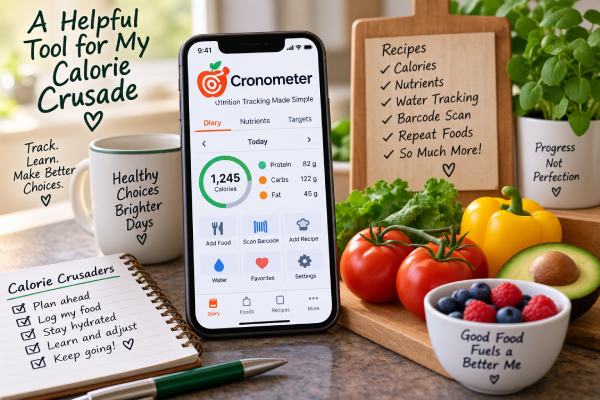
    I’m counting calories again, and this time around I have a tool that makes the job a whole lot easier. It’s the Cronometer calorie tracker, and it has quickly become one of my favorite tools in my Calorie Crusader toolbox.

    Before I go any further, I want to make something clear. Cronometer isn’t paying me to write this, and this isn’t a sponsored post. I just think it’s an excellent tool and one that’s worth talking about.

    More Than a Calorie Counter

    Obviously, one of the main things I need to know on my Calorie Crusade is how many calories I’m eating. Cronometer does that very well, but that’s really just the beginning.

    It also lets me see what’s actually in the food I’m eating.

    At a glance, I can keep an eye on things like fiber, sodium, added sugar, saturated fat and calcium. Instead of simply knowing that I’ve eaten a certain number of calories, I can look at a meal—or my entire day—and get a much better picture of how I’m doing nutritionally.

    I like that.

    Sometimes calories only tell part of the story.

    One of My Favorite Features: Recipes

    One of my favorite things about Cronometer is the recipe feature.

    I cook something, enter the ingredients into Cronometer, and it does the math for me. Once the recipe and serving information are entered, I can see the calories and nutrients in a serving.

    That is incredibly handy.

    Without something like this, figuring out the calories in a homemade recipe can become quite a project. You have to figure out the calories in every ingredient, add everything together and then divide it into servings.

    Cronometer does the work.

    And once I’ve entered the recipe, I have it available the next time I make it.

    Finding Foods Is Easy

    Cronometer also has a very large food database. Most of the foods I’m looking for are already there.

    For packaged foods, I can also scan the barcode. That can save quite a bit of time when I’m standing in the kitchen trying to get a meal entered.

    The easier it is to record what I eat, the more likely I am to actually do it.

    And that’s important.

    I Don’t Have to Enter the Same Things Over and Over

    Most of us have foods we eat regularly.

    If I eat the same thing from one day to the next, Cronometer has a premium feature that makes it possible to repeat those foods instead of making me start from scratch every morning.

    That may sound like a small thing, but those little conveniences add up.

    In a previous Calorie Crusaders article, “When Life Gets in the Way of Counting Calories“, I talked about some of the things that have caused me to stop counting calories in the past. Sometimes life simply became too busy and there were too many other things demanding my attention.

    So this time I’m paying attention to anything that makes the process easier.

    If something saves me a few minutes and removes one more little chore from my day, that’s a good thing.

    Even My Water Is in There

    I can also use Cronometer to keep track of my water.

    I like having that information right there along with my food instead of trying to remember separately how much I’ve had to drink during the day.

    Again, it’s one less thing to keep track of somewhere else.

    Information Helps Me Make Better Choices

    I think this may be what I like most about Cronometer.

    It gives me information.

    If I’m low on fiber, I can see it. If I’ve had more sodium than I realized, I can see that too. I can look at calcium, added sugar, saturated fat and other nutrients instead of simply concentrating on one number at the top of the page.

    I’m still counting calories. That’s the foundation of what I’m doing.

    But I’m also learning more about the food those calories are coming from.

    Another Tool for the Calorie Crusade

    No app is going to lose the weight for me.

    I still have to decide what I’m going to eat. I still have to decide how much I’m going to eat. And I still have to enter it honestly.

    But a good tool can make all of that easier.

    That’s what Cronometer does for me.

    It takes something that could involve a lot of calculating, writing things down and looking things up and puts it all together in one place.

    For someone who has decided to count calories for a long time—not just for a few weeks—that convenience matters.

    Glenn has even started using Cronometer too, so apparently I’m not the only one in this house who finds all those numbers useful.

    I’m trying to build habits that I can continue even when life gets busy.

    And right now, Cronometer is one of my favorite tools in the Calorie Crusader toolbox.